


In trusted partnership with the KnowledgeFlow Cybersafety Foundation

Every day, educators and students navigate a digital world where safety is never guaranteed, but awareness can transform vulnerability into confidence. Online interactions, from logging into accounts to browsing classroom resources, leave trails of information and open doors to both opportunity and risk. Understanding how data flows, how threats operate, and how individuals can protect themselves equips teachers to guide students toward safe, thoughtful, and empowered digital participation.
Module 3: Digital Defence brings educators into the essential world of cybersecurity and online safety. This module teaches how digital threats emerge, how scams manipulate trust, and how personal information spreads, often without users realizing it. You will learn to recognize deception, protect sensitive data, and build strong habits that prioritize online safety in learning environments. From privacy settings to social engineering, from device protection to digital footprints, these lessons translate directly into real-world classroom practice.
Scroll down to continue your PDday journey!
Contents
Part 1
Being Digitally Secure
Do you know what actually happens when your devices are compromised, suspicious emails arrive, or networks behave unexpectedly? In this submodule, you will explore the fundamentals of digital security, including personal cybersafety, organizational cybersecurity, and common online harms, and how these concepts help protect devices, accounts, and sensitive information. You will also learn about the Information Triad of confidentiality, integrity, and availability, the protect–detect–correct cycle, and layered security measures that maintain safe and reliable digital environments. Practical strategies for identifying risks, managing data, and applying security best practices will help you keep your classroom technology secure. By understanding these concepts, you can model strong digital habits, respond effectively to threats, and help students become confident, responsible users of technology.
Note: Click the video to play it or click the “Watch on YouTube” button on the bottom left of the video to view it directly in YouTube.
Test Your Knowledge!
Reflecting Back
As you reflect on digital security, consider how your everyday tech habits silently shape the norms your students internalize. Your password choices, device care, and response to suspicious notifications all communicate what you value, even when you are not teaching the topic directly. If students see you create strong passwords, lock devices when unattended, question unexpected links, and talk through your reasoning, they begin to understand security as a routine part of digital life. If those behaviours are inconsistent, they may instead learn that convenience outweighs caution. Think about what your current habits might be teaching and how small, intentional adjustments could strengthen your classroom’s online security culture.
Part 2
Minimizing and Protecting your digital footprint
Do you know how every click, post, and login contributes to a trail of information about you online? In this submodule, you will explore how digital footprints form through both active actions and passive data collection, how websites and apps gather and store personal information, and how dark patterns can influence user behaviour. You will also learn practical strategies to minimize your footprint, manage accounts and permissions, control cookies and app settings, and protect personal and professional information with strong passwords, encryption, and multi-factor authentication. By understanding these concepts, you can safeguard your own privacy, model responsible digital habits, and guide students to make informed choices online.
Note: Click the video to play it or click the “Watch on YouTube” button on the bottom left of the video to view it directly in YouTube.
Test Your Knowledge!
Reflecting Back
Now that we’ve established a base of digital footprints, you should reflect on how to help students see the difference between the parts of their footprint they create intentionally and the parts collected automatically. For example, you could have students examine a shared classroom platform or social media account to identify posts, comments, or uploaded work they actively contributed to, rather than data tracked in the background, such as login times or interaction metrics. In your own classroom, you could model strong digital footprint management by regularly reviewing privacy settings on shared tools, limiting the visibility of student submissions, and demonstrating thoughtful posting practices, such as explaining why certain details should or should not be shared publicly. By combining these activities, students learn to make intentional choices online, understand how passive data is collected, and see real-life examples of responsible digital behaviour in action.
Part 3
Digital Deception
Scams and social engineering are increasingly common threats that can target both teachers and students online. In this submodule, you will explore the different types of digital scams, including phishing, fear-based, transaction, tech, and romance scams, and learn to identify warning signs such as urgency, secrecy, and requests for personal information. You will also examine social engineering techniques, recognize manipulative dark patterns in digital interfaces, and practice strategies to protect yourself, your students, and your classroom. By understanding these concepts, you can model safe digital behaviour, detect suspicious activity, and create a safer online environment for everyone.
Note: Click the video to play it or click the “Watch on YouTube” button on the bottom left of the video to view it directly in YouTube.
Test Your Knowledge!
Reflecting Back
Thinking about how to incorporate lessons on digital security, digital footprints, scams, and social engineering into your classroom means reflecting on real situations your students might encounter online. For example, a student might receive an email that appears to be from a trusted school platform, asking them to reset their password. You could use this as a teaching moment to discuss phishing, showing students how to verify the sender, inspect links, and recognize warning signs before taking any action. Another scenario could involve students sharing projects or photos online without realizing that their digital footprint can remain visible long after they post. By exploring how posts and shared content contribute to their long-term online presence, you can help students understand the consequences of sharing information carelessly and guide them in making thoughtful, safe choices. Focusing on these examples allows you to model responsible online behaviour and provide practical strategies for students to protect themselves and their information.
Part 4
Cybersecurity Careers For Students
Cybersafety and cybersecurity are both essential for keeping students and school systems safe in digital environments. In this submodule, you will explore the difference between personal online safety and technical protections, and learn how to apply both in a classroom setting. You will examine everyday cybersafety practices, such as managing privacy settings and recognizing risky online behaviours, alongside cybersecurity measures like strong passwords, multi-factor authentication, and secure device management. You will also discover how to introduce students to cybersecurity career pathways, including the skills, education, and certifications needed for roles in network defence, ethical hacking, and digital forensics. By understanding these concepts, you can model responsible digital behaviour, reinforce safe online practices, and connect classroom learning to real-world opportunities in the growing field of cybersecurity.
Note: Click the video to play it or click the “Watch on YouTube” button on the bottom left of the video to view it directly in YouTube.
Reflecting Back
When thinking about incorporating cybersecurity lessons into other subjects, one effective approach is to tie them directly to the digital activities students already do. For example, in a Science class, students often use online databases or websites to research topics, gather data, or submit lab reports. You could use this opportunity to teach them how to check whether a source is legitimate, recognize suspicious links or pop-ups, and set strong, unique passwords for any accounts used to access shared documents or lab software. You might even create a short “research safety checklist” to guide students in verifying URLs, avoiding downloads from untrusted sites, and managing permissions on collaborative platforms. By embedding cybersecurity practices into a real classroom task, students see the immediate value of staying safe online, while you reinforce habits that protect both their personal information and the integrity of their work.
You have now completed all parts of Module 3 and explored cybersafety, cybersecurity, digital security practices, and cybersecurity career pathways. You have learned how to protect yourself and your students, model safe digital habits, and introduce students to future opportunities in this growing field.
To complete this module and receive your credit, please complete the following quiz and receive a grade of at least 70% to pass.
PDday.ca Module 3 Quiz
Lesson Plans
PDday.ca Lesson Plans for your classroom
Explore our full collection of digital media literacy and cybersafety lesson plans designed specifically for K–12 classrooms, fitting effortlessly into your existing schedule and curriculum. Each lesson is engaging, easy to deliver, and intentionally designed to be completed in 45 minutes or less; making classroom integration simple and stress-free.
PDday.ca Teaching Materials
Here are three slide shows, filtered by grade range (Grades 9–12, 5–8, and 1–4), that you can add straight into Google Classroom. These slideshows make it easy for you to turn the information into teachable lessons with ready-to-go slides so that students can become the experts themselves. You can present them in class or share them with students and parents to explore on their own.
PDday.ca Class Activities
Here are lesson activities you can use directly in the classroom and upload to Google Classroom. There is a teacher version and a student version that can be directly handed out. This version works as a teacher guide or can be shared with students for easy use. The activities are curriculum-aligned and designed to deepen students’ understanding of cybersafety concepts. They are organized by grade range (Grades K-4 and Grades 5-12) and conveniently included in a single document for easy access.
Curriculum Alignment for Teachers
We have streamlined the integration of our cyber safety materials into your curriculum with a comprehensive guide. This guide helps educators align our resources with provincial standards, making it easy to incorporate our content into lesson plans while meeting educational outcomes. By filtering by province, grade, and course, educators can find the exact resource or lesson plan needed to include cybersafety education.
Tip Sheets & Guidebooks
Digital Privacy
5 tips to protect your online privacy
Being Pseudonymous
Skim a privacy Policy: 4 Key Words
6 ways to improve device security
First Principles of Cybersafety Guide For grades K-3
First Principles of Cybersafety Guide For grades 4-8
Scams
Gaming Scams Tip sheet
What to do after a breach
Romance Scam Tip sheet
“Help me set up a new account” scam
Sextortion Scams
Common online scams Tip sheet
Cybersecurity Careers
Cybersecurity Certifications overview
Career Pathways in Cybersecurity
Additional Courses
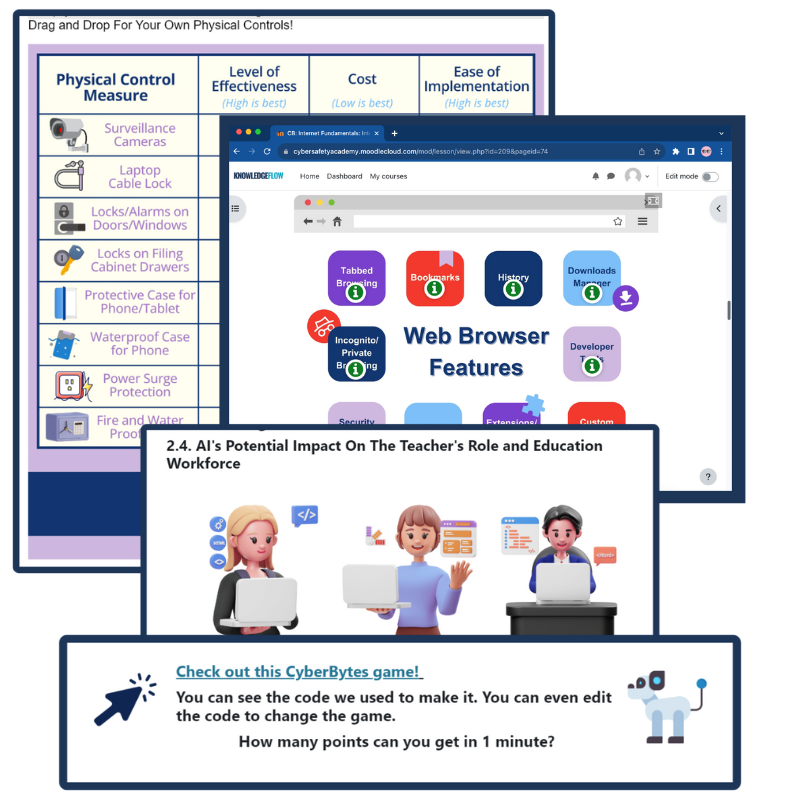
CyberBytes: Empowering Educators Through Digital Literacy
The CyberBytes Program is a free, self-paced course created exclusively for K-12 educators in Canada, designed to fit your schedule and enhance both your personal and professional growth. Developed by certified cybersecurity experts, this program empowers you to create engaging, tech-savvy classrooms while equipping you and your students with the skills needed to thrive in an ever-evolving digital landscape.
If you would like to learn more about…
- Apply core digital security principles to protect, detect, and respond to online risks;
- Understand how personal data, privacy settings, and digital footprints affect online safety;
- Recognize and avoid scams, dark patterns, and manipulative digital practices;
- Obtain cross-curriculum ready-to-use lesson plans, classroom posters and checklists, student resources, tip sheets, and other external resources;
Please go to ICTC’s online CyberBytes course and complete the Cyber Security and Privacy module by clicking the button on the left.
Teacher Toolkit

#UnHackable classrooms, teachers, principals, and administration lead to #UnHackable schools. This weekly, 12-week email course will be sent directly to your email address, covering the foundations of cybersafety you and your classroom need to know. These toolkits were created to include easy-to-digest content you can seamlessly add to your classroom activities and personal life. Ready-to-use lesson plans are included in each edition!

The Information and Communications Technology Council (ICTC) is a neutral, not-for-profit national centre of expertise with the mission of strengthening Canada’s digital advantage in the global economy. For over 30 years, and with a team over 100 experts, they have delivered forward-looking research, practical policy advice, and capacity-building solutions for individuals and businesses. ICTC’s goal is to ensure that technology is utilized to drive economic growth and innovation and that Canada’s workforce remains competitive on a global scale. ICTC’s PDday is funded by the Government of Canada’s CanCode Initiative.
 English
  French
  Chinese
  Spanish
  Ukrainian