


У надійному партнерстві з Фондом кібербезпеки KnowledgeFlow

Щодня в класі вчителі бачать, наскільки глибоко технології впливають на навчання, стосунки та поведінку учнів. Цифрові медіа впливають на те, як учні мислять, спілкуються та розуміють світ - від відеороликів, які вони дивляться, до постів, якими вони діляться. Ми створили цей навчальний серіал, щоб дати вчителям навички та впевненість, які допоможуть їм вести учнів у цьому світі чітко та цілеспрямовано.
Модуль 1: Медіа-мислення запрошує вчителів зупинитися, навчитися та поміркувати над своєю роллю лідера в цифровому навчальному просторі. Цей модуль допоможе вам сформувати мислення, необхідне для оцінювання інформації в Інтернеті, навчити учнів ставити під сумнів те, що вони бачать, реагувати на дезінформацію та моделювати відповідальну поведінку в Інтернеті. Ви також вивчите такі ключові ідеї, як цифрове громадянство, включаючи кібербулінг, цифрові сліди та те, як реагувати на шкоду, завдану в Інтернеті. Ці уроки безпосередньо пов'язані з повсякденним викладанням і допоможуть вам створити безпечніше, більш поінформоване та більш сприятливе навчальне середовище для ваших учнів.
Прокрутіть вниз, щоб розпочати свою подорож PDday!
Зміст
Частина 1
Цифрова медіаграмотність
Як вчителі, ви працюєте в класах, де учні щодня прокручують, обмінюються та інтерпретують цифровий контент, часто не до кінця розуміючи, звідки він походить і як формує їхнє мислення. У цьому субмодулі ви дізнаєтеся, що означає цифрова медіаграмотність для сучасних учнів, чому вона необхідна для їхньої безпеки та успіху і як ви можете допомогти їм стати вдумливими та обізнаними учасниками цифрового простору. Розуміння цих засад створить підґрунтя для розвитку критичного мислення, впевненості учнів у собі та безпечної взаємодії в Інтернеті.
Примітка: Натисніть на відео, щоб відтворити його, або натисніть кнопку “Переглянути на YouTube” в нижньому лівому куті відео, щоб переглянути його безпосередньо на YouTube.
Перевірте свої знання!
Частина 2
Правда у стрічці
Щодня студенти стикаються із заголовками, відео та дописами, які виглядають правдоподібними, але не є такими. Деякі з них перекручують факти, деякі маніпулюють емоціями, а деякі навмисно обманюють. У цьому субмодулі ми розглянемо різні типи оманливого та шкідливого контенту: від дезінформації та дезінформації до маніпуляції та неправдивої інформації. Ви отримаєте інструменти, які допоможуть студентам ставити глибші запитання, ретельніше оцінювати та розпізнавати, коли щось в Інтернеті не є тим, чим здається.
Примітка: Натисніть на відео, щоб відтворити його, або натисніть кнопку “Переглянути на YouTube” в нижньому лівому куті відео, щоб переглянути його безпосередньо на YouTube.
Перевірте свої знання!
Відображення минулого
Ви, мабуть, усвідомлюєте, що запобігання поширенню оманливої інформації починається з розвитку двох ключових компонентів цифрової медіаграмотності: критичного мислення та дослідницьких навичок. Навчити учнів використовувати такі стратегії, як бічне читання, оцінки CRAAP або CRISP, а також перевіряти інформацію з різних джерел, що заслуговують на довіру, могло б допомогти їм виявити сфабриковані статистичні дані та цитати експертів, згенеровані штучним інтелектом. Розмірковуючи над власною відповіддю, ви можете помітити можливості перетворити цей момент на керований навчальний процес, запропонувавши учням разом проаналізувати статтю, змоделювати кроки перевірки або обговорити, як поширюється дезінформація. Ви також можете переробити проект, включивши в нього необхідну оцінку джерел, контрольні точки для перевірки достовірності або короткі уроки про те, як інструменти штучного інтелекту можуть генерувати реалістичний, але оманливий контент. Ці проактивні стратегії допоможуть учням краще навчитися самостійно та впевнено орієнтуватися в цифровій інформації.
Частина 3
Онлайн з наміром
У цьому субмодулі ви дізнаєтеся, що означає бути відповідальним цифровим громадянином і як права та обов'язки в Інтернеті впливають на те, як учні створюють і поширюють контент. Ви також розглянете, що таке цифрові сліди, чому вони важливі для ідентичності та безпеки, і як допомогти учням захистити їх та керувати ними. Цей субмодуль дає вам практичні знання та стратегії для інтеграції цифрового громадянства у повсякденне навчання, щоб ваші учні могли будувати позитивну, свідому онлайн-ідентичність.
Примітка: Натисніть на відео, щоб відтворити його, або натисніть кнопку “Переглянути на YouTube” в нижньому лівому куті відео, щоб переглянути його безпосередньо на YouTube.
Перевірте свої знання!
Відображення минулого
Можливо, ви вже зрозуміли, що допомога учням перед випадковим або необдуманим дописом у соціальних мережах безпосередньо пов'язана з такими компонентами цифрової грамотності, як управління ідентичністю в Інтернеті та створення контенту. Якщо допомогти учням подумати про аудиторію, довготривалість і потенційні наслідки, це спонукає їх зробити паузу перед тим, як ділитися інформацією. Інтеграція швидких рутинних процедур (таких як контрольний список “подумай, перш ніж публікувати”, обговорення цифрових слідів або приклади дописів, які ненавмисно поширюють дезінформацію) може допомогти учням сформувати сильніші судження. Ви також можете поміркувати над тим, чи передбачені у вашому навчальному плані можливості для учнів практикувати створення етичного, достовірного цифрового контенту. Посилення таких уроків може зменшити ймовірність виникнення подібних ситуацій і допомогти учням стати більш відповідальними учасниками онлайн-комунікації.
Частина 4
Визнання цифрової шкоди
У цьому субмодулі ви зануритесь у типологію видів шкоди в Інтернеті та дізнаєтесь, як кожен з них проявляється у повсякденному цифровому житті ваших учнів. Ви також вивчите найпоширеніші онлайн-злочини, від яких потерпає сучасна молодь, зокрема кібербулінг, сексуальні домагання та новітні форми шкоди, що стали можливими завдяки глибоким фейкам та іншим маніпуляціям, керованим штучним інтелектом. Чітко розуміючи ці ризики, ви будете краще підготовлені до розпізнавання тривожних сигналів, ефективної підтримки учнів та створення безпечного цифрового простору у вашому класі та за його межами.
Примітка: Натисніть на відео, щоб відтворити його, або натисніть кнопку “Переглянути на YouTube” в нижньому лівому куті відео, щоб переглянути його безпосередньо на YouTube.
Перевірте свої знання!
Частина 5
Реагування на цифрову шкоду
Ви навчилися визначати ризики в Інтернеті, тепер настав час зосередитися на діях. У цьому модулі ми розглянемо, як реагувати на кібербулінг, сексуальні домагання, дезінформаційні спіралі та інші форми цифрової шкоди зі спокоєм, чіткістю та співчуттям. Ви дізнаєтеся, які кроки слід зробити, як підтримати учнів емоційно та практично, а також як створити культуру, в якій учні почуватимуться в безпеці, говорячи про це та звертаючись по допомогу.
Примітка: Натисніть на відео, щоб відтворити його, або натисніть кнопку “Переглянути на YouTube” в нижньому лівому куті відео, щоб переглянути його безпосередньо на YouTube.
Перевірте свої знання!
Відображення минулого
Можливо, ви вже замислювалися над тим, як ваш власний досвід зіткнення зі шкодою в Інтернеті (наприклад, дезінформацією, порушенням приватності чи емоційно шкідливою взаємодією) пов'язаний з компонентом цифрової грамотності, що є складовою безпеки в Інтернеті. Усвідомлення того, наскільки складно може бути інтерпретувати ризики в Інтернеті або реагувати на них, допоможе вам краще зрозуміти, що можуть відчувати ваші учні. Ваша роль як дорослого, якому довіряють, стає сильнішою, коли ви відкрито моделюєте безпечні практики, обговорюєте реальні приклади шкоди в Інтернеті та показуєте учням, як користуватися такими інструментами, як функції повідомлення, налаштування конфіденційності, надійні паролі та стратегії верифікації. Навчаючи учнів критично оцінювати онлайн-простір, безпечно реагувати та знати, коли звертатися по допомогу, ви підтримуєте їхню цифрову стійкість і допомагаєте їм сприймати вас як надійний ресурс у вирішенні онлайн-викликів.
Щоб завершити цей модуль і отримати кредит, будь ласка, заповніть наступний тест і отримати оцінку не менше 70% пройти.
PDday.ca Модуль 1 Вікторина
Плани уроків
PDday.ca Плани уроків для вашого класу
Ознайомтеся з нашою повною колекцією планів уроків з цифрової медіаграмотності та кібербезпеки, розроблених спеціально для класів K–12, які легко вписуються у ваш існуючий розклад та навчальну програму. Кожен урок є цікавим, простим у проведенні та спеціально розробленим для завершення за 45 хвилин або менше, що робить інтеграцію в клас простим та безстресовим процесом.
PDday.ca Навчальні матеріали
Ось три слайд-шоу, відфільтровані за класами (9-12, 5-8 та 1-4), які ви можете додати безпосередньо в Google Classroom. Ці слайд-шоу допоможуть вам легко перетворити інформацію на повчальні уроки з готовими слайдами, щоб учні могли самі стати експертами. Ви можете презентувати їх у класі або поділитися ними з учнями та батьками для самостійного вивчення.
PDday.ca Класні заходи
Ось завдання для уроку, які ви можете використовувати безпосередньо в класі та завантажити в Google Classroom. Існує версія для вчителя та версія для учнів, яку можна роздати безпосередньо. Ця версія працює як посібник для вчителя або можна поділитися ними зі студентами для зручного використання. Заняття відповідають навчальній програмі і призначені для поглиблення розуміння студентами концепцій кібербезпеки. Вони організовані за класами (класи K-4 і класи 5-12) і зручно об'єднані в одному документі для легкого доступу.
Посібники для студентських дискусій
Використовуйте наведені нижче посібники для дискусій, щоб сприяти спілкуванню в класі та поза ним на теми кібербезпеки та технологій.
4-8 класи Посібники для обговорення
9-12 класи + Посібники для обговорення для дорослих
Узгодження навчальних програм для вчителів
Ми спростили інтеграцію наших матеріалів з кібербезпеки у вашу навчальну програму за допомогою комплексного посібника. Цей посібник допомагає педагогам узгодити наші ресурси зі стандартами провінції, що полегшує включення нашого контенту до планів уроків та досягнення освітніх результатів. За допомогою фільтрації за провінцією, класом та курсом вчителі можуть знайти саме те, що їм потрібно. ресурс або план уроку необхідно включити навчання з питань кібербезпеки.
Пам'ятки та довідники
Кібербулінг
6 основних порад, які допоможуть вам розпізнати кібербулінг Порадник
День рожевої сорочки в Канаді: Порадник з протидії булінгу в Інтернеті
Дезінформація/дезінформація/малоінформація
Поради щодо сканування C.R.I.S.P.
Людські упередження: Їх роль у дезінформації та поради щодо соціальних мереж
Online Harms
Типологія онлайн-порадників щодо шкоди в Інтернеті
Сексуальне насильство
Порадник для підлітків щодо зображень, створених штучним інтелектом
Поради щодо зображень, згенерованих штучним інтелектом, для підтримки жертви Порадник
Посібник зі створення зображень на основі штучного інтелекту для директорів та вчителів Порадник
Порадник щодо шахрайства з вимаганням
Посібник "Як підтримати жертву домагань
Посібник для підлітків щодо запобігання шахрайству з метою сексуального насильства
Посібник "Як підтримати жертву домагань
Додаткові курси
CyberBytes: Розширення можливостей освітян через цифрову грамотність
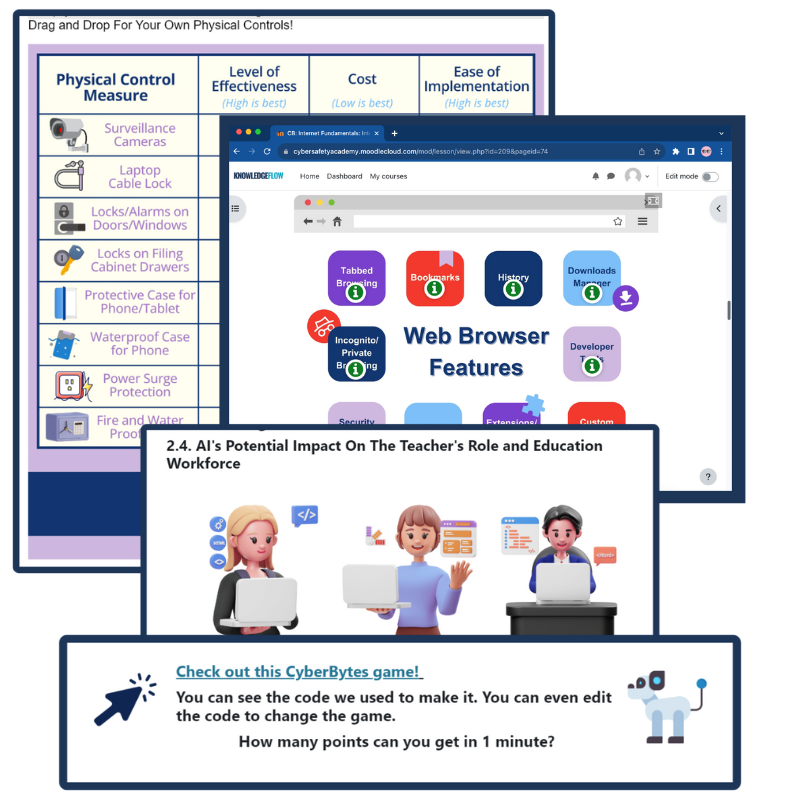
Програма CyberBytes - це безкоштовний курс, створений спеціально для вчителів K-12 у Канаді, який можна пройти в індивідуальному темпі, щоб він відповідав вашому графіку та сприяв вашому особистому та професійному зростанню. Розроблена сертифікованими експертами з кібербезпеки, ця програма дає вам можливість створювати цікаві, технічно підковані класні кімнати, одночасно надаючи вам і вашим учням навички, необхідні для процвітання в постійно мінливому цифровому ландшафті.
Якщо ви хочете…
- Продовжуйте розширювати свої знання про цифрову грамотність, дезінформацію, цифрове громадянство, цифрову шкоду та всі інші теми, які ми розглянули вище;
- Отримайте готові до використання міжпредметні плани уроків, плакати та контрольні списки для класу, матеріали для учнів, пам'ятки та інші зовнішні ресурси.;
Перейдіть за посиланням Онлайн-курс ICTC «CyberBytes» і заповніть Кібер в культурі та суспільстві модуль, натиснувши кнопку нижче.
Ігри з бритвами: Зручний посібник для підлітків

“Ігри з бритвами: Посібник для підлітків?” Зачекай. Що?! Ця назва точно привертає вашу увагу. Чи були б ви так само заінтриговані, якби вона називалася “Розвінчання дезінформації”? Мабуть, ні. Вітаємо, ви щойно повелися на клікбейт! Але не хвилюйтеся, цього разу вона нешкідлива і навмисна.
Цей курс розроблений, щоб допомогти підліткам впевнено орієнтуватися в складному світі онлайн-інформації. У сучасну цифрову епоху, коли пости, відео та повідомлення поширюються швидше, ніж будь-коли, легко піддатися на те, що є правдою, напівправдою або цілковитою брехнею. Цей курс дасть підліткам інструменти для критичного мислення, розпізнавання дезінформації, дезінформації та неправдивої інформації, а також для усвідомленого вибору. За допомогою Метод C.R.I.S.P. Під керівництвом цього посібника вони навчаться розбиратися в шумі та контролювати свій цифровий світ, розширюючи можливості для себе та тих, хто їх оточує.

У "The Рада з питань інформаційно-комунікаційних технологій (ICTC) є нейтральним, неприбутковим національним експертним центром, місія якого полягає у зміцненні цифрових переваг Канади у світовій економіці. Понад 30 років команда зі 100 експертів проводить перспективні дослідження, надає практичні політичні консультації та рішення з розбудови потенціалу для приватних осіб та бізнесу. Мета ICTC - забезпечити використання технологій для стимулювання економічного зростання та інновацій, а також збереження конкурентоспроможності канадської робочої сили у світовому масштабі. PDday ICTC фінансується урядом Канади в рамках ініціативи CanCode.

 English
  French
  Chinese
  Spanish
  Ukrainian